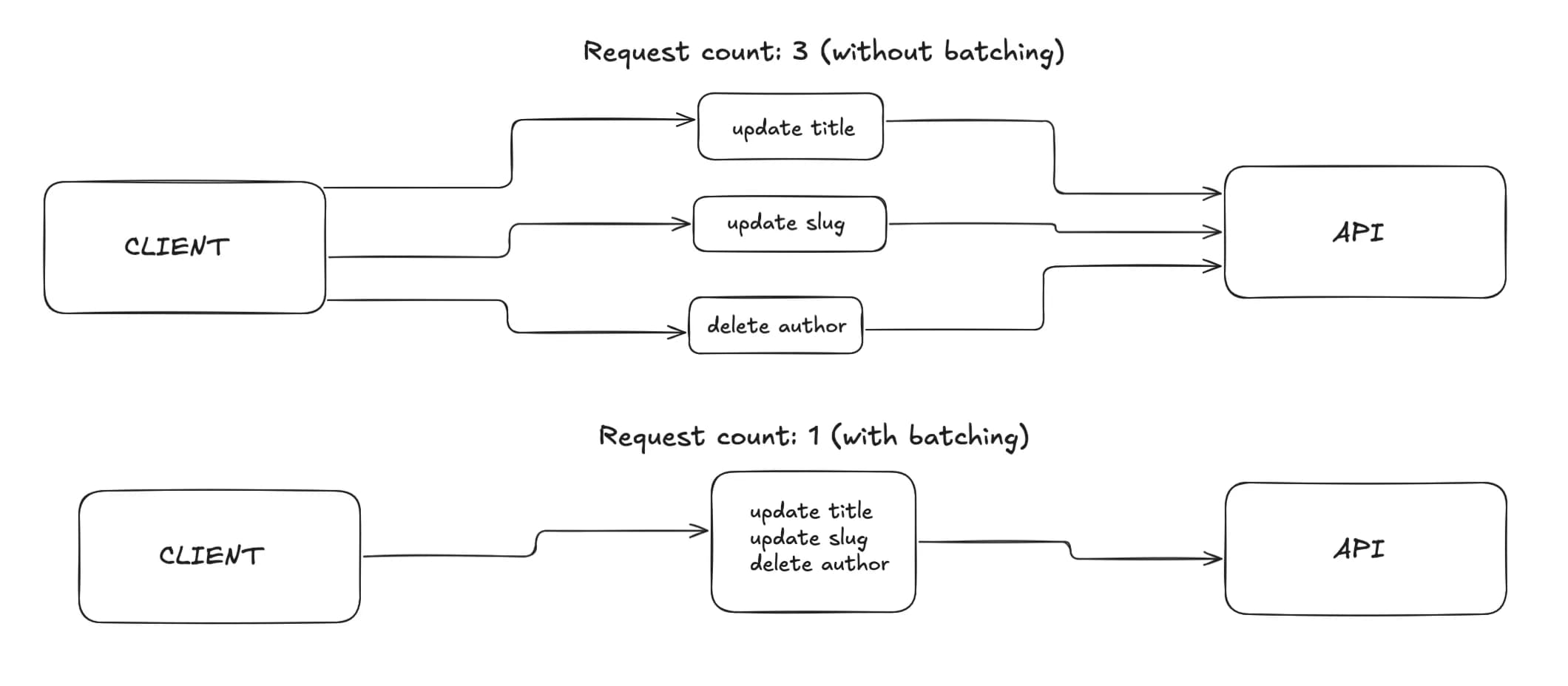
Batching involves taking a few potential requests and, instead of making three separate requests, combining them into one. On the client side, this means fewer network calls and a smoother user experience. On the server side, it prevents endpoints from being overwhelmed by a burst of small requests.
In this post we will:
- explain what batching is and why it matters
- build a tiny, reusable
Batcher<T>utility - show a minimal React example that uses it
What is batching?
Batching collects work for a short, fixed window and sends it all at once. Typical use cases:
- analytics or telemetry events
- autosave or form-change sync
- reordering items (e.g., drag-and-drop) that produce many quick updates
The trade-off is small, intentional delay: you wait up to the window length to send the work.
How batching works
- you have a queue to hold items
- you have a timer (the “window”) that resets whenever a new item arrives
- when the timer expires, you flush: send the accumulated items and clear the queue
Implementation
Here is a small, generic utility you can drop into any project.
type BatcherOptions<T> = {
  windowMs: number; // how long to wait after the last item before flushing
  onFlush: (items: T[]) => Promise<void> | void; // what to do with the batch
};

export class Batcher<T> {
  private queue: T[] = [];
  private flushTimer: ReturnType<typeof setTimeout> | null = null;
  private readonly windowMs: number;
  private readonly onFlush: (items: T[]) => Promise<void> | void;

  constructor(options: BatcherOptions<T>) {
    this.windowMs = options.windowMs;
    this.onFlush = options.onFlush;
  }

  add(item: T): void {
    this.queue.push(item);
    this.resetFlushTimer();
  }

  async flush(): Promise<void> {
    if (this.queue.length === 0) return;
    const items = this.queue.splice(0, this.queue.length);
    this.clearFlushTimer();
    await this.onFlush(items);
  }

  private resetFlushTimer(): void {
    this.clearFlushTimer();
    this.flushTimer = setTimeout(() => {
      void this.flush();
    }, this.windowMs);
  }

  private clearFlushTimer(): void {
    if (this.flushTimer) {
      clearTimeout(this.flushTimer);
      this.flushTimer = null;
    }
  }
}
React usage (minimal)
The example below batches “events” for 2 seconds and POSTs them to /api/events.
import { useEffect, useRef } from "react";

type EventItem = { id: string; type: string };

function useEventBatcher() {
  const batcherRef = useRef<Batcher<EventItem> | null>(null);

  if (!batcherRef.current) {
    batcherRef.current = new Batcher<EventItem>({
      windowMs: 2000,
      onFlush: async events => {
        await fetch("/api/events", {
          method: "POST",
          headers: { "Content-Type": "application/json" },
          body: JSON.stringify({ events }),
        });
      },
    });
  }

  useEffect(() => {
    return () => {
      // Flush any remaining items on unmount
      void batcherRef.current?.flush();
    };
  }, []);

  return {
    enqueue: (event: EventItem) => batcherRef.current!.add(event),
  };
}

export function Example() {
  const { enqueue } = useEventBatcher();

  return (
    <button onClick={() => enqueue({ id: crypto.randomUUID(), type: "click" })}>
      Enqueue
    </button>
  );
}
When to use batching
- when many fast, small updates would otherwise spam your API
- when slight delay (e.g., up to 1–5 seconds) is acceptable
- when you want to reduce costs by shrinking request count
Tips and trade‑offs
- choose
windowMsbased on acceptable UX delay and event rate - flush on teardown (component unmount, page hide) so you do not lose work
- decide what happens on
onFlushfailure (retry, drop, or store locally) - keep items small; avoid building huge batches that can time out
Conclusion
Batching is a small abstraction that pays off quickly: fewer requests, less server load, and a calmer UI. The generic Batcher<T> above gives you a drop‑in starting point you can tailor to your needs.
Kacper Siniło
Fullstack Developer